Posts

Showing posts with the label Actuarial Reporting

How Should I Do My UAT? (1): Program / Spreadsheet / Model

Image
If you are working in the actuarial department of an insurance company, it may not be uncommon to you involving in various testing exercises, which are known as User Acceptance Testing ("UAT") in general. Some of us may think that UAT is only applicable to the policy administration system implementation project (Oops... Do I remind on the non-stop follow-ups from your Project Manager?), but in fact UAT is also needed for the programs, spreadsheet templates or actuarial model we use to perform various actuarial studies - whether they are developed internally or by external consultant. It is particularly important for those tools which we are going to use to perform regular studies. In my view, there is no one right answer for the approach to be used in performing UAT on program / spreadsheet / model - most importantly, the approach that you adopt should allow the required testing to be carried out in a structured manner, and it should not create too much "processes...

Spreadsheet Tips (3): How to Create a Spreadsheet Template?

Image
"Do you agree that spreadsheets cannot be separated from actuarial life?" Yes, I totally agree without any doubt - almost all actuarial exercises that I know involve spreadsheets, especially MS Excel. I even heard a actuarial joke before teasing actuaries: "An actuary is a person who creates complicated spreadsheet". Tips (1): Simple Rules for Good Spreadsheet Templates Well, actually I don't quite agree with this actuarial joke. I admit that I have few spreadsheet templates that are complicated, but many spreadsheet templates I created before are actually pretty simple (despite the number sheets). Why should we create a complicated spreadsheet template if we can use a simpler way to do our work? I used to advise my ex-team members previously to follow some simple rules when creating their spreadsheet templates: Avoid advanced Excel formulas if possible - you can do most of your jobs using common Excel formulas (such as SUM, SUMIF, SUMPRODUCT, COUNTIF, VLO...

Spreadsheet Tips (2): How to Structure Your Spreadsheet?

Image
As I have mentioned in my previous article about spreadsheet tips (" Spreadsheet Tips (1): More Flexible MOP Template "), you don't need to be an Excel expert or having a blackbelt in VBA in using the tips I have shared. In fact, the more "sophisticated" your spreadsheet is, the higher possibility your spreadsheet will drive your life into misery. In this article, I will share some simple rules in formatting your spreadsheet and structuring your spreadsheets. Oops, am I refraining you from becoming Picasso or Van Gogh in your office? Tip (1): Apply Standard Rules of Formatting One of the best ways to make your spreadsheets more efficient is to apply standard formatting rules when you setup a spreadsheet template. Why? By having standard formatting rules, you don't need to spend time to figure out which colors / border style / font face & size will make your spreadsheet nicer. Also, you don't need to have headache anymore when you need to combine...

Spreadsheet Tips (1): More Flexible MOP Template

Image
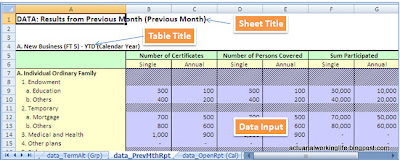
In case you are looking for some Excel / Spreadsheet tips on how to make your templates more efficient, perhaps you can get some ideas from the tips I share below. Afraid of bombastic command or VB coding? Don't worry, the tips I share below are very simple and you don't need to be an expert to use the tips. The following tips use examples from the template I used to compile movement of policy (MOP) statistics (i.e. new business, in force business & termination/alteration) . However, you may apply the same ideas for other types of templates as well. Tips (1): Produce results by plan code level, not product group Normally, the MOP statistics are reported in specific product groups, such as "Whole Life", "Endowment", "Temporary" etc. in BNM Form L6-L8 (Conventional Insurance) / FT5-FT7 (Takaful). It is common for us to group our data by the required product groups using data processing applications (e.g. FoxPro, Data Conversion System ...

Movement of Policy (5): Termination / Alteration

Image
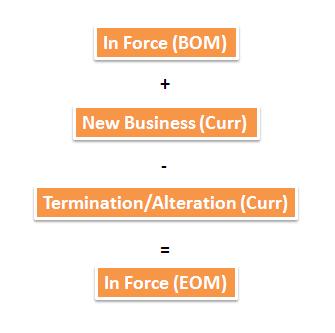
Note: Please note that the following discussion is only for movement of policy (MOP) of individual life/family takaful products only. Among the three statistical reporting forms (L6, L7 & L8 for life insurers; FT5, FT6, FT7 for takaful operators), the termination / alteration statistics are considered as the most complicated. As all three forms need to be reconciled (please refer to the above diagram), many people have no choice to put the differences that cannot be reconciled as "Others" (another popular word to be used is "balancing item"). In fact, it is not complicated if you follow the correct approach to do these termination / alteration statistics. If you re-arrange the formulas in the above diagram, you can easily see that actually these statistics intend to explain the changes/movements occur previous month in force policies and new business incepted in current month, by comparing to the current month in force policies. So, what is the best way...

Movement of Policy (4): In Force

Image
Note: Please note that the following discussion is only for movement of policy (MOP) of individual life/family takaful products only. Compared to new business statistics, in force statistics are much simpler - basically, what we need to report are the policies as at end of particular period (month-end / quarter-end / year-end) which are considered as "in force" (i.e. the coverage is still valid). Depending on the policy admin system we use, we can identify the in force policies by referring to their policy statuses. In one of the system I used previously, the "in force" business are those policies having the following policy statuses: In Force : Normal premium paying policies. Paid up : Applicable to the limited payment products only; policies which all required premiums have been paid. Reduced Paid Up (RPU) : The policyholders decide not to continue paying the remaining premiums (or by other scenarios defined in the contracts) and covert the policies to...

Movement of Policy (3): New Business

Image
Note: Please note that the following discussion is only for movement of policy (MOP) of individual life/family takaful products only. When we create a new entry in a policy admin system, normally we will create a " proposal " - so that the underwriters can perform necessary assessments and decide the proposed life can be accepted or request for additional information (such as medical checkup). After all the underwriting requirements have been fulfilled (and of course we have received "adequate" premiums), the proposal will be converted to an " in force " policy - and our agents will be happily informed their clients: "Congratulation! You are now covered by Company ABC!" In simple words, our " new business " statistics are used to report the proposals that have been converted to in force policies in a particular period (month/quarter/year). How frequent we should prepare the statistics? I would recommend to prepare new business st...

Movement of Policy (2): Actuarial? Data Warehouse?

If someone asks me: "Who should be the most appropriate person in charge in doing movement of policy (MOP) reporting - Actuarial or Data Warehouse (or IT Department)?" After some hesitation, I shrug my shoulders: "Frankly, I'm sorry that I don't know..." Ideally, MOP reporting is basically summarizing & categorizing the data available in the policy admin system. If the system data are "clean" (what a luxurious wish), we can just apply some rules to segregate the available policies into "new business", "termination/alteration" and "in force" - just like what we do using Excel, FoxPro or DCS (Data Conversion System). Furthermore, the rules are actually easily understood by even non-actuarial colleagues. Now, it sounds like it is a bit too expensive to as Actuarial Department to do MOP reporting. However, in reality, the data in the policy admin system in many companies are not clean - especially those with group ...

Back to Basic - Movement of Policy (MOP)

Image
If you ask me what a fresh graduate should learn first when he joins your actuarial department, I will definitely answer he needs to learn  movement of policy  (MOP). In my view, MOP is the basic of all actuarial studies - it is about how a policy " behaves" during the entire life cycle, i.e. from when the policy is set in force until the policy is terminated (including maturity / expiry). By having a good understanding in MOP, it will be easier for us to visualize the relevant cash flows occur during policy term - especially when we setup an actuarial model to project cash flow. When I setup the Takaful Library for my client, the "base" variables I setup first are MOP related variables. From what I learn from friends in the industry, many companies are struggling to get the " correct " MOP statistics - which are known as L6, L7 & L8 for conventional insurers and FT5, FT6 & FT7 for takaful operators (namely "New Business", "Termi...